Article sections
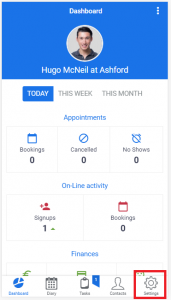
To access the section to manage (add and edit) your Appointment Types, you need to click the ‘Settings’ button at the bottom of your screen, which will take you to the ‘Settings’ area.
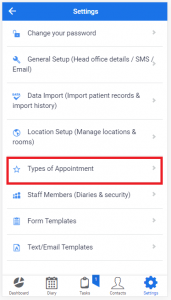
Then select Types of Appointment
The Types of Appointments section allows you to manage existing appointment types and to add new ones.
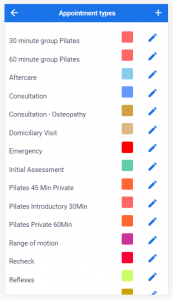
Add new Appointment Type – click on the + icon (top left hand corner to create a new Appointment Type)
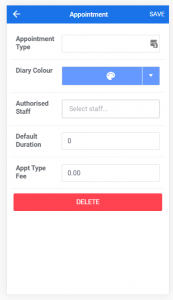
Enter the Appointment Type name.
Select a Colour from the palette – this colour will appear on the diary when this appointment type is selected.
Select the Staff – from your list of Staff Members who will be authorised to have this type of Appointment – if the member of staff is not authorised her then this type of appointment will not appear as an option when making a booking on that particular diary.
Choose a Default Duration – in minutes – this can be edited when making a booking, but required a default value to be entered.
Similarly, an Fee is required in the Appt Type Fee field, but this can also be edited when the booking is made (should you require a flexible fee structure).
Edit an existing Appointment Type – from the list of existing appointments, click on the pencil icon for the appointment that you wish to edit
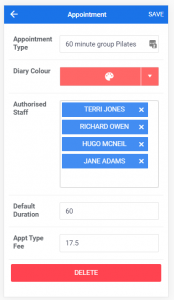
Once selected, you can edit the Appointment type name, diary colour, the authorised staff (staff that can have an booking made with this appointment type) and the default duration and fee (which of course can be edited within the individual appointment).
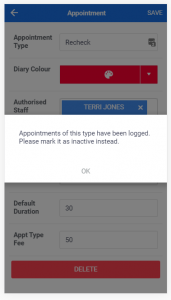
Furthermore you have the option to delete the Appointment Type (with a confirmation)
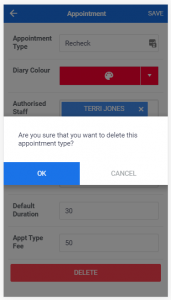
If there are existing bookings which have been made with this appointment type you will not be able to delete the appointment – instead you will be prompted to mark it as inactive