Article sections
Upon logon to the App, the initial landing page is the Dashboard.
The Dashboard allows the practitioner to quickly view a read only summary of their position, either by Today, This Week or This Month.
You can access the dashboard from any screen in the app via the Quick Links toolbar at the bottom of the screen.
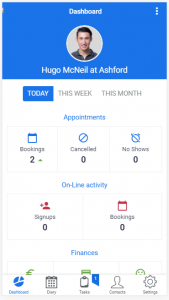
The Dashboard is a view only summary sheet covering (by the selected time period):
Appointments – how many booking the practitioner has, how many have been cancelled and how many no shows
On-Line Activity – summary of how many New Signups and how many bookings have originated via the On-Line Booking portal
Finances – Fees, Payments and Unpaid summary
Workload – how many New Patients and how many Tasks are due